Underexposed Seaside Phone Snapshot — AI Image Prompt Guide
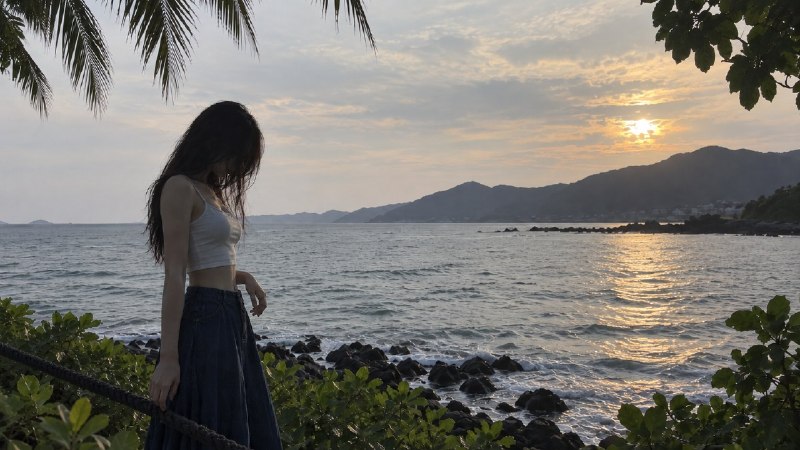
Specify underexposure, cool grey colour and imperfect white balance for an ordinary seaside phone snapshot with a readable composition.
English translation of the public case notes.
Generate a horizontal 16:9 seaside snapshot at dusk that feels ordinary rather than professionally polished. The text brief specifies subject placement, clothing, pose, coastal layers and intentionally imperfect phone-camera rendering. Set the frame and pose first, then the scene, followed by photographic shortcomings. Place the person near the left golden-section position and leave the sea, setting sun and distant mountains on the right. Keep the composition comfortable even though the subject is underexposed. Describe the defects concretely: limited dynamic range, grey midtones, dark shadows, cool muted colour and imperfect white balance. These are appearance constraints rather than a vague request to make an unattractive picture. Exclude HDR, a luminous polished finish, film styling, cinematic grading, teal-orange colour, luxury travel-photography aesthetics and attractive rim light. The source uses this reversed aesthetic direction to counter excessive beautification.
Original case notes (Chinese)
🫧 画面感拉满|把旅拍故意拍普通 想做同款:文生图 / 图像编辑。 先感受这组画面:这个案例反向追求“失败的路人照”:欠曝、灰冷、白平衡不准、无滤镜都被写成明确目标。适合学习如何用负面审美约束压住模型的过度美化,生成更像手机原相机的旅行随拍。 氛围配方: 类型:文生图 输入:一段完整场景提示,包含人物位置、服装姿态、海岸环境、手机摄影质感与反向风格约束 目标:得到一张16:9海边傍晚随手拍,主体欠曝、色彩灰冷、构图舒服但不专业 关键词:手机随手拍 / 失败路人照 / 海边傍晚 / 逆光欠曝 / 灰冷低饱和 / 无滤镜 / 普通白平衡 重点:先锁定画幅、人物位置和姿态,再写场景层次,最后用大量摄影缺陷约束整体质感,避免模型自动美化 约束:避免HDR、通透感、胶片感、电影调色、青橙色调、高级旅拍感和漂亮轮廓光 💡 复刻质感时抓住三点 • 把“不好看”的摄影问题具体化:欠曝、动态范围一般、中间调发灰、暗部发黑 • 用构图细节保留可读性:左侧黄金分割人物,右侧留海面、夕阳和远山 • 负面约束集中在质感层面,而不是简单写“不要好看”,更容易稳定压住过度修饰 #GPTImage2 #OpenAI #AI绘画 #海边随拍 #低饱和写实 #反向审美约束