Prompt Lookbook

A Consistent Character Introduction Card — AI Image Prompt Guide
A Consistent Character Introduction Card — AI Image Prompt Guide
A Consistent Character Introduction Card — AI Image Prompt GuideA Consistent Character Introduction Card — AI Image Prompt Guide — 2A Consistent Character Introduction Card — AI Image Prompt Guide — 3

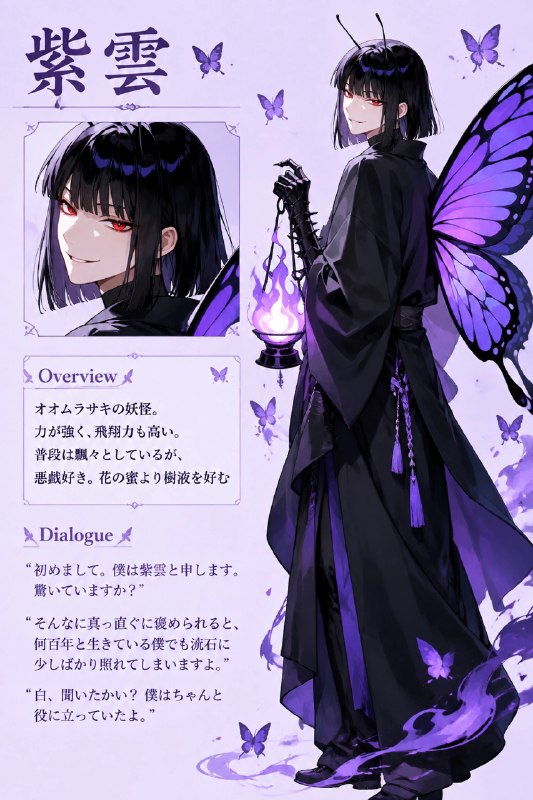
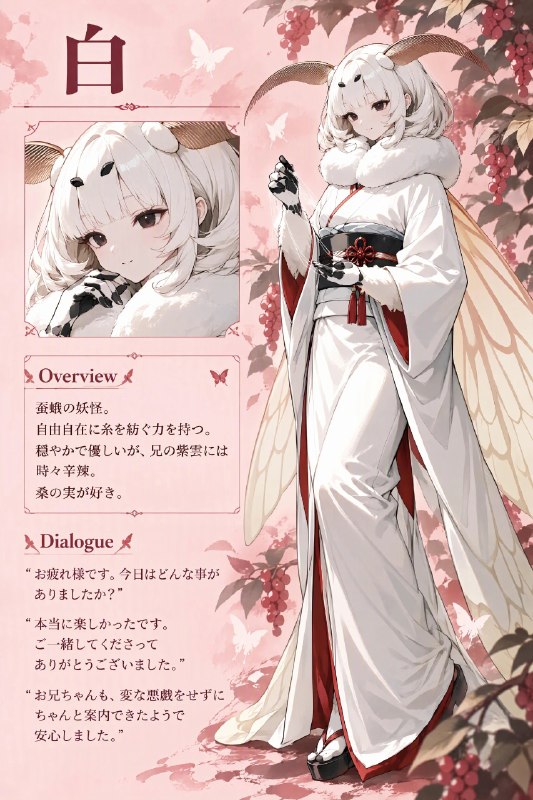
Turn character artwork into a repeatable introduction-card format. The layout includes a standing character, upper-left name, summary box and quotation below.

English translation of the public case notes.

Image-to-image case pairing one reference for character appearance with another for introduction-card layout. The aim is a repeatable design with a standing figure, name at the upper left, summary box and dialogue below. Supply character reference 1, layout reference 2, background colour, name, overview and three lines of dialogue. A two-character version needs separate images and text for both characters. Specify background and layout first, page elements next, then bind character references and exact text. Requiring only the supplied text helps keep the layout clean. Avoid extra wording, misplaced names, dialogue inside the wrong box and anatomically implausible poses. The source's correction concerning the second character's “Dialo…” field is cut off. [Source text is truncated.] Use the two references for separate appearance and layout roles. Define Name, Overview and Dialogue in distinct sections; the additional border instructions and subsequent tips are incomplete. [Source text is truncated.]

Original case notes (Chinese)

🛠️ 技法拆解|把角色图做成统一介绍卡 先说玩法:文生图 / 图像编辑。想复刻这张图? 如果你要复刻,先注意:这个案例适合学习“角色参考图 + 版式参考图”的组合用法:保留人物特征,同时借用另一张图的介绍卡格式。亮点在于文字区域、站姿插画和背景色都被明确拆分,适合批量制作角色设定页。 复刻路线: 类型:图生图 输入:角色参考图 1、版式参考图 2、背景色、姓名、概要文、三句台词;双人版还需要两名角色各自的参考图与文本 目标:生成统一格式的角色介绍卡,包含站立角色插画、左上姓名、概要框和下方台词 关键词:角色介绍卡 / 参考图控版式 / 站立插画 / 文本逐字保留 / 概要信息框 / 双栏角色页 重点:先指定背景色与版式参考,再说明版面元素,最后绑定角色参考图和文本内容;“只包含指定文字”是控制排版干净度的关键 约束:避免添加额外文字、错放姓名位置、把台词装进框内、人物姿势不合人体结构;双人版还应修正第二位角色的 Dialo… 💡 防止跑偏的三个要点 • 用一张参考图专门控制角色外观,另一张参考图专门控制版式,减少风格与布局互相干扰 • 将 Name、Overview、Dialogue 分段定义,并明确框线… #GPTImage2 #OpenAI #AI绘画 #角色设定卡 #动漫立绘 #参考图控版

Full prompts

Chinese prompt

杰作。顶级质量。生成一张角色介绍图。
将背景颜色设置为[背景色]。以参考图 2 作为格式指南。绘制角色的站立插画,并包含“Name”+“Overview”+“Dialogue”。只逐字包含指定文本;不要包含任何其他文字。将姓名写在左上角。角色插画:根据参考图 1 绘制角色。在保留参考图中人物身体特征的同时,灵活调整脸部角度和姿势,使其在人体结构上不显得不自然,从而创作出自然的插画。
Name: “[姓名]”。
Overview: 将以下概述文本放入一个框中。
Overview text: “[概要文]”。
Dialogue: 将以下第 1–3 行用引号括起来,并放在概述下方。不要把它们放入框中;按原样书写。
Line 1:“[台词]”。
Line 2:“[台词]”。
Line 3:“[台词]”。

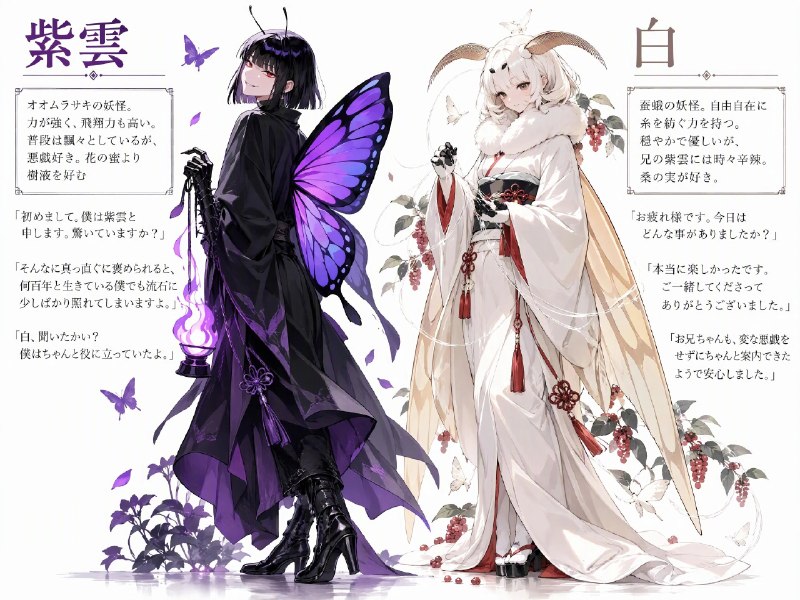
像图 3 那样把两个人汇总在一起,也可以通过引用源的应用来实现,不过这边还有改进空间啊。

话说,紫云为什么穿高跟鞋?
被 AI 当成女孩子了吗?

【两人汇总的提示词】
杰作。顶级质量。生成一张双角色介绍图。将背景颜色设置为[背景色]。将角色 1 的介绍放在左侧,将角色 2 的介绍放在右侧。绘制每个角色的站立插画,并分别包含“Name”+“Overview”+“Dialogue”。只逐字包含指定文本;不要包含任何其他文字。将姓名写在左上角。在保留参考图中人物身体特征的同时,灵活调整脸部角度和姿势,使其在人体结构上不显得不自然,从而创作出自然的插画。
角色 1 的插画:根据参考图 1 绘制角色。
角色 1 的姓名:“[人物1的姓名]”。
角色 1 的概述:将以下概述文本放入一个框中。Overview text; “[人物1的概要]”。
角色 1 的对话:将以下第 1–3 行用引号括起来,并放在概述下方。不要把它们放入框中;按原样书写。
Line 1:“[台词]”。
Line 2:“[台词]”。
Line 3:“[台词]”。
角色 2 的插画:根据参考图 2 绘制角色。
角色 2 的姓名:“[人物2的姓名]”。
角色 2 的概述:将以下概述文本放入一个框中。Overview text;“[人物2的概要]”。
角色 1 的对话:将以下第 1–3 行用引号括起来,并放在概述下方。不要把它们放入框中;按原样书写。
Line 1:“[台词]”。
Line 2:“[台词]”。
Line 3:“[台词]”。

English prompt

A masterpiece. Top quality. Generate character introduction image.
Set the background color to [背景色]. Reference Image 2 as a guide for the format. Draw a standing illustration of the character and include "Name" + "Overview" + "Dialogue." Include only the specified text verbatim; do not include any other text. Write the name in the upper-left corner. Character illustration: Draw the character based on Reference Image 1. Create a natural-looking illustration by flexibly adjusting the angle of the face and posture—while retaining the physical characteristics of the person depicted in the reference image—to the extent that it does not appear unnatural in terms of human anatomy. 
Name: "[名前]". 
Overview: Enclose the following overview text in a box. 
Overview text: "[概要文]". 
Dialogue: Enclose the following lines 1–3 in quotation marks and place them below the overview. Do not enclose them in a box; write them as is. 
Line 1:"[台詞]". 
Line 2:"[台詞]". 
Line 3:"[台詞]".

画像3のように2人分まとめるのも引用元の応用で出来るけど、こちらはまだ改良の余地があるなぁ

というか、紫雲は何故ハイヒール?
AIに女の子扱いされた?

【二人まとめたプロンプト】
A masterpiece. Top quality. Generate two character introduction image. Set the background color to [背景色]. Place the introduction for Character 1 on the left and the introduction for Character 2 on the right. Draw each standing illustration of the character and include each "Name" + "Overview" + "Dialogue." Include only the specified text verbatim; do not include any other text. Write the name in the upper-left corner. Create a natural-looking illustration by flexibly adjusting the angle of the face and posture—while retaining the physical characteristics of the person depicted in the reference image—to the extent that it does not appear unnatural in terms of human anatomy. 
Illustration of Character 1: Draw the character based on Reference Image 1. 
Name of Character 1: "[人物1の名前]". 
Overview of Character 1: Enclose the following overview text in a box. Overview text; "[人物1の概要]".
Dialogue of Character 1: Enclose the following lines 1–3 in quotation marks and place them below the overview. Do not enclose them in a box; write them as is. 
Line 1:"[台詞]". 
Line 2:"[台詞]". 
Line 3:"[台詞]". 
Illustration of Character 2: Draw the character based on Reference Image 2. 
Name of Character 2: "[人物2の名前]". 
Overview of Character 2: Enclose the following overview text in a box. Overview text;"[人物2の概要]". 
Dialogue of Character 1: Enclose the following lines 1–3 in quotation marks and place them below the overview. Do not enclose them in a box; write them as is. 
Line 1:"[台詞]". 
Line 2:"[台詞]". 
Line 3:"[台詞]".