From Character Reference to Combat Sprites — AI Image Prompt Guide
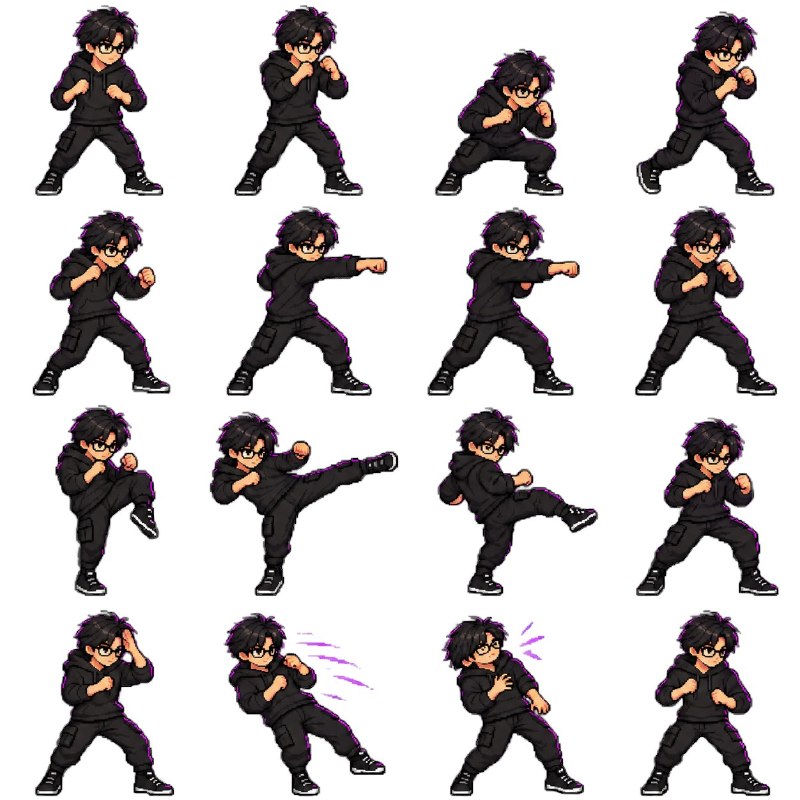
Turn a reference character into a sixteen-frame combat action grid, preparing structured material for frame slicing and GIF assembly.
English translation of the public case notes.
Turn a single character reference into a pixel-art combat sprite sheet, then cut and align the frames for a GIF. The target is a 4×4 grid containing sixteen frames at the stated 128px scale: four frames each for a fighting stance, punching, kicking and taking a hit. Suitable uses include game prototypes, character showcases and animated social posts. Describe the sheet format and pixel specification before the four action groups. Keep character proportions, placement, frame order and frame count consistent throughout. Require a genuinely transparent background rather than a painted checkerboard. Frame cutting and alignment are a separate follow-up step; generating a sheet does not itself produce a finished GIF.
Original case notes (Chinese)
⚙️ 稳定复刻|角色图一键变战斗动图 复刻路径:图像案例。想复刻这张图? 先看它解决了什么:这个案例展示了从单张角色图生成像素战斗精灵表,再用网格拆分与对齐制作 GIF 的流程。值得学习的是把动作、帧数、尺寸和透明背景写清楚,适合游戏原型、角色设定展示和社媒动图。 参数与约束: 类型:图生图 输入:一张角色参考图,以及像素精灵表生成指令 目标:得到 4x4、共16帧的战斗动作精灵表,并进一步拆分为GIF 关键词:角色参考 / 像素风 / 精灵表 / 4x4网格 / 战斗动作 / 透明背景 / GIF拆帧 重点:先定义输出形态和规格,再列动作分组与每组帧数;“128px、4x4=16帧、构え/拳击/踢击/受击”是控制一致性的核心。 约束:避免背景生成成棋盘格图案;避免每格角色比例漂移、站位不齐、动作顺序混乱或帧数不足。 💡 最影响结果的三点 • 把“精灵表”与“4x4=16帧”放在前面,先锁定版式结构 • 用“动作4帧”这种分组写法,减少模型自由发挥导致的缺帧 • 若要转GIF,追加“按4x4分解、位置对齐”,把动画处理交给后续流程 #GPTImage2 #OpenAI #AI绘画 #像素角色 #战斗精灵表 #网格拆帧